I accidentally overwrote a file and saved it, is there any way that can help me to recover overwritten files? Don't worry. This article will show you where do overwritten files go and how to recover overwritten files.
Overwriting or replacing a file is no longer a new problem for most Windows users. Yet, it's still a tough issue for most users to resolve. So where do overwritten files go and how to restore overwritten files?
Where do overwritten files go?
We know when the files are deleted, formatted, or lost from the computer, it still exists and be only marked with "deleted" on disk space, but the disk space occupied by the file data is marked as "idle". In this time, although we can't see these files, the files are still "staying" on the disk. As long as the new file is not created after deleting the file, the file still exists.
However, if the location of the file is occupied or partially overwritten, the possibility of the file being recovered is not high. Even though, it is not impossible to be restored.
How to restore overwritten files?
As you can see, there are too many users asking for help on how to restore overwritten files. To fix this issue, here below we introduce 3 possible overwritten data recovery solutions. Although there are no guarantees your files can be reinstated, it's worth trying.
Method 1. Find and recover overwritten files from Temp files
Usually, while we are editing a Word or Excel file, the Office will automatically create some temporary files in a specific location on Windows PC.
Each time, when the Office application automatically saves a file, it will create a temp file and the file won't overwrite the previous one. So if you overwrote or replaced an Excel or Word document, you can try to find the overwritten file from.TMP file:
1. Follow the temp file folder location on your PC and find the Excel/Word temp files with.TMP extension:
● For Windows 7 users:
C:\Users\name\AppData\Roaming\Microsoft\Excel\ or C:\Users\name\AppData\Roaming\Microsoft\Word\
1. Follow the temp file folder location on your PC and find the Excel/Word temp files with.TMP extension:
● For Windows 7 users:
C:\Users\name\AppData\Roaming\Microsoft\Excel\ or C:\Users\name\AppData\Roaming\Microsoft\Word\
● For Windows 8/10 users:
C:\Users\\AppData\Local\Microsoft\Office\UnsavedFiles\
2. Locate and find the temporary excel or word files begin with "$" or "~" and end with ".TMP", select the right Excel/Word temp file by date, then copy and save to another safe spot by changing the extension from.TMP to .XLS/.XLSX or .DOC/.DOCX.
After this, you've successfully recovered the overwritten Excel or Word files on your windows and you can continue using them on your PC again.
After this, you've successfully recovered the overwritten Excel or Word files on your windows and you can continue using them on your PC again.
Method 2. Retrieve overwritten files from the Previous Version
The Premise of using this method is that Windows stores previous versions of documents using the File History feature or restore points.
1. Create a new Excel/Word file with the same name of your lost Excel/Word file or find your present saved-over Excel/Word file;
2. Right-click on the Excel or Word file and select Properties;
3. Go to Previous Versions, find and select the latest version or the right version before Excel/Word replaced or saved, click Restore.
1. Create a new Excel/Word file with the same name of your lost Excel/Word file or find your present saved-over Excel/Word file;
2. Right-click on the Excel or Word file and select Properties;
3. Go to Previous Versions, find and select the latest version or the right version before Excel/Word replaced or saved, click Restore.
Then you'll get replaced or overwritten Excel or Word file restored from the previous/saved versions.
Method 3. Recover overwritten files with Bitwar Data Recovery
It is not easy to recover overwritten files. This data recovery software mentioned below is only for a try. It is not a 100% guarantee to always retrieve overwritten files back. Therefore, please first free download Bitwar Data Recovery for a try first. It is a 30-DAY free trial data recovery software that allows you to try to perform deep recovery to restore overwritten files.
Tips: DO NOT save files or software to the partition/device where have overwritten files.
Steps to recover files with Bitwar Data Recovery
Step 1: Select the partition
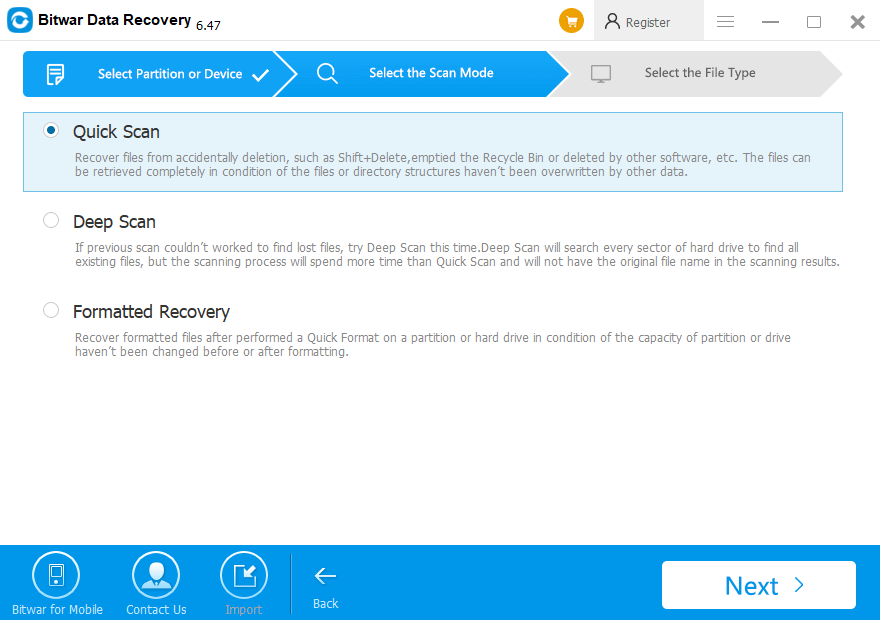
Step 2: Choose a scan mode
Select Deep Scan mode if you want to recover Overwritten or Replaced files then hit Next. The deep scan can find all the files with a detailed scanning algorithm, but will not display the file names and may take longer time.
Step3: Select the file types
Step 4: Preview and Recover Data
Try it now!
Please refer here for more about Overwritten Files Recovery.
评论
发表评论