跳至主要内容

SD Card Data Recovery Software

It is straightforward to format an SD card either on PC or on other digital devices. You can format any partition by right-clicking the partition drive letter and then choose the Format option. Besides, there is usually a Format option on the digital device, which allows users to format memory card if necessary. The formatting process turns the SD card to a new status, as it deletes everything stored on the memory card. After formatting, you can save new data on the drive. Many users format the memory card to free up space. But how to free format SD card? This article introduces free software to recover memory card.

Is It Possible to Recover Data with Free Unformat SD Card?


Sometimes, you impulsively formatted the memory card in order to clear the mess. However, you may find some precious family photos and videos are gone without backup. How to recover lost files from formatted memory card? Is it possible to recover photos or videos with a free unformat SD card?

The answer is YES. As long as the SD card hasn't been overwritten by any new data, you can recover them via simple steps with Bitwar Data Recovery Software.

Bitwar Data Recovery is an easy-to-use and risk-free data recovery utility that enables you to unformat almost all files from a formatted memory card, including photos, videos, audio files, and more.

Steps to Free Unformat SD Card with Bitwar Data Recovery


First, insert the formatted SD card to your PC or connect it via a card reader. Then download and install Bitwar Data Recovery on the computer. Now you can follow steps below to unformat data.

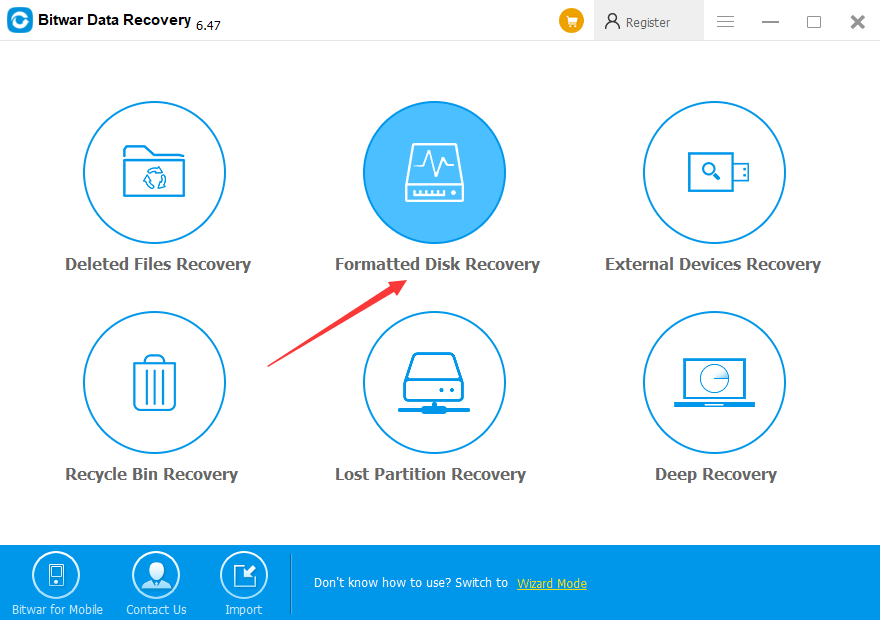
Step 1: Launch Bitwar Data Recovery, and select "Formatted Disk Recovery" option.

There are 6 recovery modes to be chosen from. "External Devices Recovery" can be used to recover lost data or deleted files from External Devices, such as SD Card, memory card, USB flash drive, etc. "Formatted Disk Recovery" can be used to recover data from formatted HDD, External HDD, SD Card, memory card, USB flash drive, digital camera, etc.
2dbf5581546cf77e55eb80b807770442_e33c4380fb9937acab970a4ed480bd1d.png?width=880


Step 2: Select the formatted SD card and click "Next."

If you choose wrong partition/devices, the software cannot find out correct data for you.

We know that Bitwar Data Recovery supports all file types. However, I suggest you select all file types because you have formatted the whole SD card. On the other hand, if you only need to get back some types like photos or videos, or document files, please select them before clicking "Scan."

Step 3: Preview and recover files, and then Unformat SD Card.

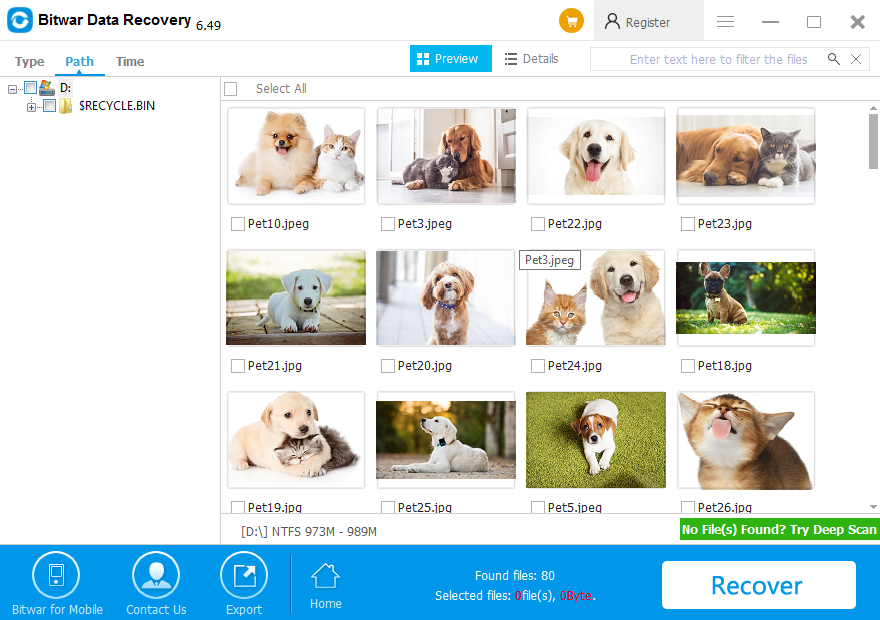
After the scan is over, you can locate files you want by Type, Path or Time and you can preview the thumbnail of the data by clicking them.

To get files recovered, you should select files and click "Recover" button. Then a window will pop up to ask you to choose a path and location to save data. Don't directly store needed data in the original partition (formatted SD Card) where the data was lost. Otherwise, the deleted data will be overwritten, resulting in permanent data damage or data loss.
b1999ae710b6dbd5a631fea2fdd58aae_d1d90f3e1adbf75f467e2b05f77dcfc4.png?width=880


Try it out!

Please refer here for more about SD Card data recovery.


评论

此博客中的热门博文

DiskPart Clean Data Recovery

  Mistakenly cleaned data or partition with a DiskPart command sometimes happen when using a computer. What should we do then? In this writing, we will talk about how to   recover data lost by DiskPart clean   with   a recovery tool , check it, and find how. “I am in big trouble because I have made a terrible mistake that I used the clean command of DiskPart on my hard drive.  Now when I turn on the hard drive, it shows only three partitions instead of four. I stored all my important files on it. It deleted my partition containing important files. What should I do to restore my partition data? Is it possible to recover data lost by DiskPart clean? Please help. Thank you!!!” Sometimes you have made such or similar blunder and lost your partition then you don’t have to worry about it! It is because you can recover data lost by DiskPart clean in just a few minutes by using a recovery tool. Before learning the details of recovery, let’s check something about DiskPar...

crc 오류 수정 방법

crc 오류 가 발생하면 이 페이지를 참조하여 해결할 수 있습니다. 그 후에  Bitwar Data Recovery 를 사용하여 데이터 손실을 복원할 수 있습니다. 데이터 오류(CRC)란 무엇입니까? CRC --순환 중복 검사는 디스크(하드 드라이브와 같은 하드 디스크와 CD, DVD와 같은 광 디스크)에 저장된 원시 데이터의 우발적인 변경을 감지하기 위해 디지털 네트워크와 저장 장치에 일반적으로 사용되는 오류 감지 기술입니다. 하드 디스크의 미디어에 좋지 않은 점이 있으면 CRC 오류가 발생합니다.  레지스트리 손상, 어수선한 하드 디스크, 실패한 프로그램 설치 또는 잘못 구성된 파일은 데이터 주기적 이중화 검사 오류를 초래할 수 있습니다. 특정 원인에 관계없이 주기적 중복성 점검 오류는 심각한 것이며 데이터 손실 또는 전체 시스템 고장을 방지하기 위해 해결해야 합니다. 다행히도 디스크 유틸리티 소프트웨어를 사용함으로써 이 문제를 해결할 수 있는 몇 가지 간단한 방법이 있습니다. 드라이브에서 " E:/을(를)액세스할 수 없습니다.  데이터 오류(CRC)입니다. "가 발생하면 먼저 데이터를 백업하십시오. Windows의 손상된 하드 드라이브 또는 원시 디스크에서 파일을 복구하는 데 매우 잘 작동하는  Bitwar Data Recovery 가 귀하에게 매우 좋은 선택입니다. 데이터 오류(CRC) 수정 방법 1. CHKDSK 유틸리티 사용하십시오. CRC 오류를 해결하려면 명령 프롬프트를 통해 CHKDSK 유틸리티를 실행하여 하드 드라이브를 복구하십시오. CHKDSK는 하드 드라이브의 무결성을 확인하고 논리 파일 시스템 오류, 불량 섹터 및 파일 시스템 메타데이터를 수정하십시오. 다음 단계를 수행하십시오. 1. 저장 장치를 PC에 연결하십시오. " Win+Q "를 누르고 검색란에  CMD 를 입력하십시오. 2. " 명령 프롬프트 "를 마우스 오른쪽 버튼으로 누르고 " 관리자 권한으로 실해 "을...

Recover Overwritten Files from Temp Files

I accidentally overwrote a file and saved it, is there any way that can help me to  recover overwritten files ? Don't worry. This article will show you   where do overwritten files go and  how to recover overwritten files . Overwriting or replacing a file is no longer a new problem for most Windows users. Yet, it's still a tough issue for most users to resolve. So where do overwritten files go and how to restore overwritten files? Where do overwritten files go? We know when the files are deleted, formatted, or lost from the computer, it still exists and be only marked with "deleted" on disk space, but the disk space occupied by the file data is marked as "idle". In this time, although we can't see these files, the files are still "staying" on the disk. As long as the new file is not created after deleting the file, the file still exists. However, if the location of the file is occupied or partially overwritten, the possibility of the f...