跳至主要内容

Recover Data from Formatted USB Drive

 Sometimes we may accidentally format USB flash disk which causes data loss. So how to recover lost data from formatted USB disk? This article offers you the best way to retrieve your data.

Reasons for Data Loss on USB Drive

● Accidental deletion

● Accidental formatting

● Improper removal of mass storage devices

● The file system converts to RAW

● An electrostatic discharge or power surge

Solutions to Recover Data from Formatted USB Drive

Tip: 

● Stop using the USB drive after formatting.

● Restore the file from the device as soon as possible.

● Once the data is overwritten, you may lose the chance to restore the formatted files

Solution 1: Retrieve Formatted Files from Pen Drive Backup

Sometimes you may have a backup of your USB available. If you have a backup, you can get back the data with the backup file directly. 

If you do not have a backup, turn to Solution 2 and Solution 3.

Tip: To avoid entire data loss, back up your USB drive regularly. 

Solution 2: Recover Data by Using CMD

CMD is a built-in management application in Windows, which is used by some users to issue various commands.

Step 1: Connect your USB drive with your computer

Step 2: Check your USB' drive letter.

Step 3: Click the search icon in the taskbar, enter "cmd", right-click "Command Prompt" and choose "Run as administrator".

Step 4: Type "chkdsk F: /f" in Command Prompt. (Replace F: with your USB' drive letter.)

Step 5: Type "Y" and then enter the drive letter of your USB drive.

Step 6: Type "F: \ >attrib –h –r –s /s /d *.*" (F refers to the drive letter or your USB)

However, unexpected errors may occur while using CMD. The command prompt will automatically retrieve all formatted files.

Solution 3: Recover Data from Formatted USB Disk with Bitwar Data Recovery 

Bitwar Data Recovery is a fast, convenient, and safe data recovery software with its user-friendly wizard, lighting scanning speed as well as its high-quality recovery.

Step 1: Connect the USB drive to your computer.

Step 2: Download Bitwar Data Recovery

Free download Bitwar Data Recovery from this website: https://www.bitwar.net/

Step 3: Choose the recovery mode

Launch Bitwar Data Recovery, and select "Formatted Disk Recovery" data recovery mode.
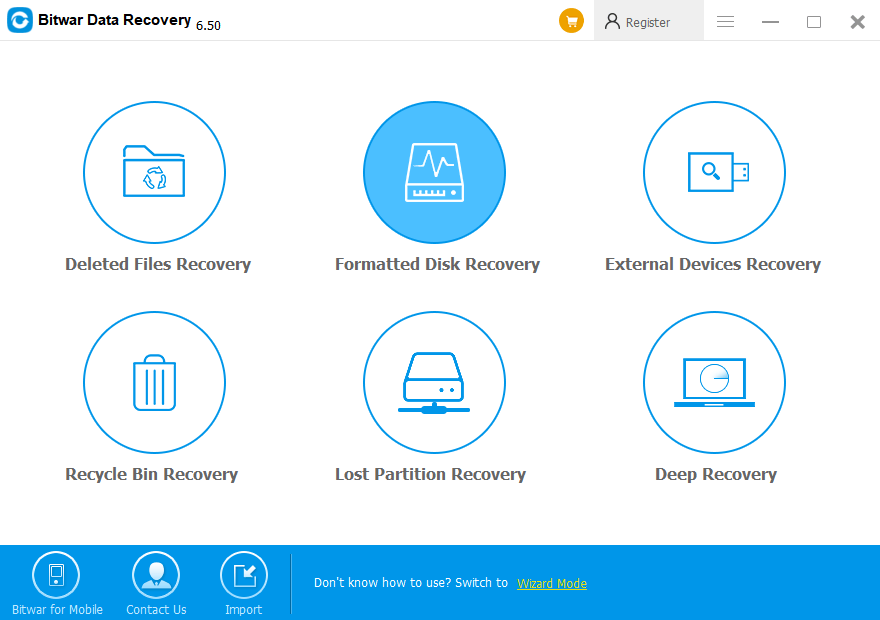
Step 4: Select Disk Partitions and Devices

Select the USB drive on the External Devices, then click "Next".

Step 5: Choose file type

Select the file type you want and click "Scan".

Step 6: Preview and Recover

Bitwar Data Recovery supports to Preview before recovery. You can click the file to preview it. The data can be previewed have a good condition to preview. While those cannot be previewed may fail to be recovered.

Why not have a try?

Please refer here for more about formatted USB data recovery.

评论

此博客中的热门博文

Recover Overwritten Files from Temp Files

I accidentally overwrote a file and saved it, is there any way that can help me to  recover overwritten files ? Don't worry. This article will show you   where do overwritten files go and  how to recover overwritten files . Overwriting or replacing a file is no longer a new problem for most Windows users. Yet, it's still a tough issue for most users to resolve. So where do overwritten files go and how to restore overwritten files? Where do overwritten files go? We know when the files are deleted, formatted, or lost from the computer, it still exists and be only marked with "deleted" on disk space, but the disk space occupied by the file data is marked as "idle". In this time, although we can't see these files, the files are still "staying" on the disk. As long as the new file is not created after deleting the file, the file still exists. However, if the location of the file is occupied or partially overwritten, the possibility of the f...

iCare Data Recovery Free License Code

Are you trying to free download  iCare Data Recovery crack  with latest license code, serial key, keygen, serial number, activation code, registration code, kickass, etc? Stop it, here's a safer  data recovery software  for you. How to Free Download iCare Data Recovery Pro Crack with Free License Code? Indeed, there are 4 common causes of seen data loss:         1. Pulling out memory card out from computer before safely removed.         2. Accidental deletion.         3. Improper partition formatting.         4. The computer fell into the water etc. Therefore, everybody knows the pain when precious data went away, but if you are searching for  iCare Data Recovery crack  with Free License Code in order to rescue files that were deleted or formatted inadvertently, Believe me, Don't do that!   Don't Believe in iCare Data Recovery Crack As we have known that iCar...

Free Data Recovery Solution

 Most of us believe that  CCleaner  is a powerful utility program to maintain the hard disk performance by cleaning automatically the potentially unwanted files, files in the Recycle Bin, Windows registry entries, etc. However, CCleaner may wipe the important files of yours in the Recycle Bin. Let's see what our customer said: I found some important files were lost from my hard disk by sending mistakenly to the Recycle Bin and unfortunately CCleaner deleted my files after I launched it, I really need the files to finish my job, and do you know how to  recover deleted files ? How to recover data after CCleaner deleted my files? Everyone knows the pain after data loss, moreover, moreover, we gonna be mad that CCleaner does not offer the data recovery mode for us to recover the files, then should we lost the data forever? The answer is no. If you cannot find any data recovery solution for recovering your files till you find this article, you can reply on Bitwar Data Rec...